How to Record a Video While Reading a Script (Without Looking Like It)
Reading a script on camera without your eyes giving it away comes down to where the text sits, how fast it scrolls and how you deliver it. Tools, setup and delivery tips.
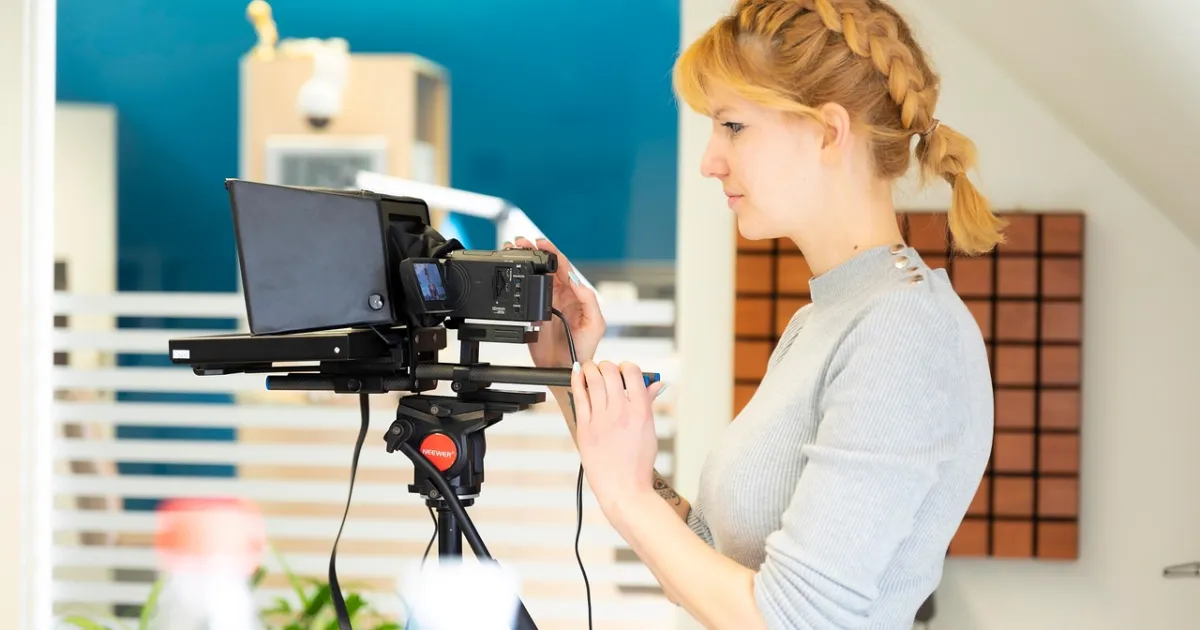
Most viewers notice when someone is reading: eyes drift to the side, the voice goes flat. The fix is to put the text as close to the lens as possible, control its speed, and write the script the way you speak.
Options
| Option | How it works | Best for |
|---|---|---|
| Teleprompter app on the same phone | Text scrolls in a small window near the front camera | Selfie-style shorts |
| Teleprompter on a second device | Tablet or phone placed directly under or beside the lens | Desk recordings |
| Beam-splitter teleprompter | Glass in front of the lens reflects text, so you look straight into the camera | Talking-head videos, frequent recording |
| Recording in chunks | Read a line, look up, deliver it, cut between takes | No equipment |
| Voiceover instead | Record audio reading freely, then add visuals | Faceless videos |
Setup tips
- Keep the text window small and right under or over the lens, so your eyes barely move.
- Sit or stand further from the camera; small eye movements are less visible at a distance.
- Use a large font and a comfortable scroll speed; many apps follow your voice.
- Light your face evenly so the screen glow does not show in your eyes.
Delivery tips
- Write for the ear: short sentences, contractions, words you would actually say. See how to write a video script.
- Read it aloud several times before recording.
- Mark pauses and emphasis in the script.
- Imagine one person you are talking to.
- Do several takes and keep the most natural one, not the most perfect.
- Look away from the text for key lines you know by heart.
When not to read
For short videos, a few bullet points instead of a full script often sound more natural. For faceless channels, recording the voice separately removes the problem entirely; see AI voice generators if you prefer a synthetic voice.
FAQ
How can I read a script while recording without it being obvious?
Put the text right next to the lens with a teleprompter app or device, sit a little further from the camera and rehearse.
Do I need a teleprompter?
Not necessarily; an app on your phone or recording in short chunks works for most creators.
How do I avoid sounding like I am reading?
Write the script the way you speak, rehearse aloud, mark pauses and imagine talking to one person.
 Scripts
 Scripts
 Scripts
 Scripts